HTML
ASSALAMUALAIKUM
Today's lab class I learnt how to make our own websites. Today's lesson resolve my question along this time about, how people making their own website. To be honest, it is a little bit annoy because need to type one by one even for paragraph for ending.
HTML or short form for Hyper Text Markup Language. It is the major language of the Internet's World Wide Web. It also ability to bring together text, pictures, sounds and link. Now HTML already upgrade to Version 5 which can make mobile apps.
HTML documents are plain-text also known as ASCII files that can be created using any text editor. There are popular editor such as Netscape Composer, Microsoft Frontpage, Microsoft Visual InterDev, HomeSite, HotDog, Web Publisher , Dreamweaver, Notepad and word. In this post I'm using notepad editor.
HTML is composed of tags, that means we "tell" browser to display the information provided. The tags always enclosed in angle-brakets (< >) .
The basic tags in HTML must have :
<HTML>
<HEAD>
</HEAD>
<BODY>
</BODY>
</HTML>
(/) at the in front means closing tags.
You can put colour and background at the websites too.
Here is the link that show many tags and have fun of making your own websites!
https://www.w3schools.com/html/
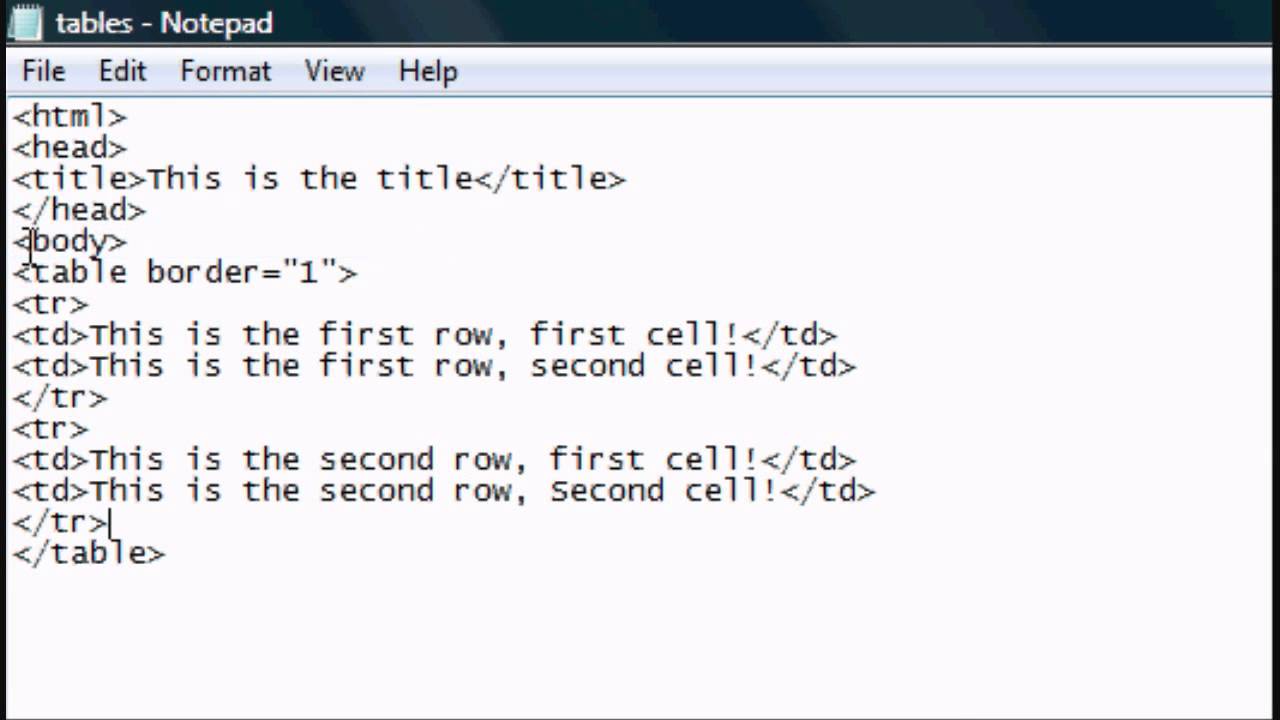
Here is the picture how its look
Today's lab class I learnt how to make our own websites. Today's lesson resolve my question along this time about, how people making their own website. To be honest, it is a little bit annoy because need to type one by one even for paragraph for ending.
HTML or short form for Hyper Text Markup Language. It is the major language of the Internet's World Wide Web. It also ability to bring together text, pictures, sounds and link. Now HTML already upgrade to Version 5 which can make mobile apps.
HTML documents are plain-text also known as ASCII files that can be created using any text editor. There are popular editor such as Netscape Composer, Microsoft Frontpage, Microsoft Visual InterDev, HomeSite, HotDog, Web Publisher , Dreamweaver, Notepad and word. In this post I'm using notepad editor.
HTML is composed of tags, that means we "tell" browser to display the information provided. The tags always enclosed in angle-brakets (< >) .
The basic tags in HTML must have :
<HTML>
<HEAD>
</HEAD>
<BODY>
</BODY>
</HTML>
(/) at the in front means closing tags.
You can put colour and background at the websites too.
Here is the link that show many tags and have fun of making your own websites!
https://www.w3schools.com/html/
Here is the picture how its look

Comments
Post a Comment